
 10 min read
Why allow: true isn’t enough when an auditor asks for evidence
When an auditor tests a control, they ask two questions about each change: was the control met, and what evidence shows how that result was reached?
Most automated controls can answer the first. A Rego policy returns allow: true or allow: false, but says nothing about what it checked. Engineers can hand-write violation messages to explain a failure, but a passing check leaves no record at all. When an auditor asks how a change passed, someone has to reconstruct the answer.
Let’s take one control from Kosli’s own catalogue and work through it: SDLC-CTRL-0004 Dependency Management. It’s a preventive control against supply chain compromise and vulnerable software reaching production. Its requirements:
- Every dependency is declared in a version-controlled file and locked.
- Every licence is on the approved list.
- Every container base image is pinned to a fixed version.
- Every build should record a software bill of materials (SBOM).
Imagine an auditor picks 25 changes from the last quarter to test this control. For each one, the pipeline recorded allow: true. The record doesn’t show which packages the policy read, which licences it compared, or whether it found any base images to check.
So, an engineer rebuilds the evidence by hand. For each sampled change, they dig through months-old pipeline logs, find the lockfile, Dockerfile and SBOM that went into that build, and check them against the control again. The auditor gets a reconstruction of each decision, and only for 25 of the quarter’s changes.
Today we’re releasing Ergo, an open source language for writing explainable policies. An Ergo policy runs on OPA, and records how it reached its result: what it checked, the value it read, and why each check passed or failed.
Controls as code
Every control in our Secure SDLC template describes a practice we claim to follow. A policy turns that claim into an automated check. The check runs on every change, so nobody fills in a spreadsheet after the fact.
We write these policies in Rego and run them with Open Policy Agent (OPA), the open standard for policy as code. Each policy reads the Kosli trail for a change: the commits, builds, artifacts and attestations recorded as the change moved through the pipeline. The same policy runs in the Kosli CLI and on Kosli’s servers, so a decision never depends on who asked for it.
In Designing an automated SDLC control, we broke every control into four parts: facts, a policy, a decision, and a decision report. Rego and OPA handle the first three well. The decision report, the record of which facts were considered and how the policy reached its result, is the part Rego leaves you to build yourself. It is also the part an auditor needs most.
A verdict without its reasons
Rego is good at yes or no, but a “yes” might mean 200 packages checked, or none, and the record looks the same either way.
Here’s a simplified version of our original Rego policy for this control, trimmed to the check that every lockfile entry is pinned to an exact version. You don’t need to follow the code; what matters is what it leaves out of the record.
allow if {
    # ...artifact, attestation and the other dependency checks
    count(lock_violations) == 0
}

lock_violations contains sprintf("the dependency lockfile entry '%v' is not exact-pinned — dependencies must be pinned to a single version", [trim_space(line)]) if {
    some line in lock_lines
    regex.match(`^[A-Za-z0-9._-]+\s*(>=|<=|~=|!=|<|>)`, line)
}
The policy works, but it has two problems:
- Passing checks aren’t recorded. The rule produces output only for an entry with a version range. An exact-pinned entry leaves nothing behind, so the record can’t show the check ran.
- Engineers write every explanation by hand. Each violation is a
sprintfsentence, written separately in each policy. No two policies report the same way, and no tool can read them consistently.
allow comes out true. In the full policy, an SBOM package with no version field makes the version comparison undefined, so the policy skips the version check for that package. In the record, a skipped check looks the same as a passing one.
Introducing Ergo
Ergo is built on Rego, so policies keep running on OPA. Instead of a single allow, every evaluation returns a report with one row for each subject and check.
Ergo generates that report from the policy itself, in the same format every time, so nobody writes violation messages by hand. A check that can’t read its value fails with cause absent, so missing fields and undefined values show up as failing rows instead of disappearing. Ergo also counts the subjects each requirement found: a requirement with nothing to check shows “0 of 0” in the report, and one whose list of subjects is missing altogether fails.
An Ergo policy has three parts:
- Subjects: the things being tested, like deployments, pull requests, or packages.
- Scope: which subjects the policy is about. Ergo records the subjects it leaves out of scope, and why they were excluded, rather than dropping them altogether.
- Checks: the rules each subject must pass, each written as a sentence.
Ergo handles the iteration and writes the report. Because every policy produces the same format, a deployment policy and a licence policy can be stored and compared side by side.
Ergo doesn’t depend on Kosli. It works on any JSON you give OPA, so the same approach fits pull request approvals, deployment windows, access reviews or cloud configuration. It isn’t limited to software either: our bakery tutorial checks cake batches against allergen and baking rules.
The dependency control, rewritten
With Ergo, the policy reads like the control. The control page says lock files MUST be used to ensure reproducible builds, and a lockfile only does that if every entry is pinned to a single version. The Ergo policy says:
subjects:
  lockfile entry:
    description: A package line of the lockfile
    from: lock_entries
    identified_by: entry

requirements:
  lock_entries:
    description: Every lockfile entry is pinned to a single version
    subject: lockfile entry
    min_subjects: 0
    checks:
      exact_pin:
        description: The lockfile entry is pinned to a single version
        assert: "entry does not match '^[A-Za-z0-9._-]+\\s*(>=|<=|~=|!=|<|>)'"
This is the same check as the Rego rule above, with the same pattern. The Rego version tells an engineer how to find entries with a version range. The Ergo version states what the control requires, in words a risk reviewer can check against the control page. The other requirements follow the same pattern: a description in plain English, and an assertion that says exactly what the check tests.
The policy judges five kinds of subject: the build artifact, its lockfile, each lockfile entry, each package in the SBOM, and each base image. Every one of them gets its own rows in the report.
If you’re moving an existing policy, the split between Rego and Ergo is what matters. Rego still does the extraction: it parses the lockfile, Dockerfile and SBOM, and normalises package names and versions so they can be compared. Ergo takes those facts and judges them. Moving our policy to Ergo kept the extraction code and replaced only the hand-written violation rules.
The artifact requirement is what guarantees the evidence exists: it fails unless the lockfile, Dockerfile and SBOM attestations are all complete. With that in place, the other requirements can accept an empty list (min_subjects: 0). A lockfile with no entries would show “0 of 0” under lock_entries, and fail the lockfile requirement, which needs at least one exact pin.
What the auditor now sees
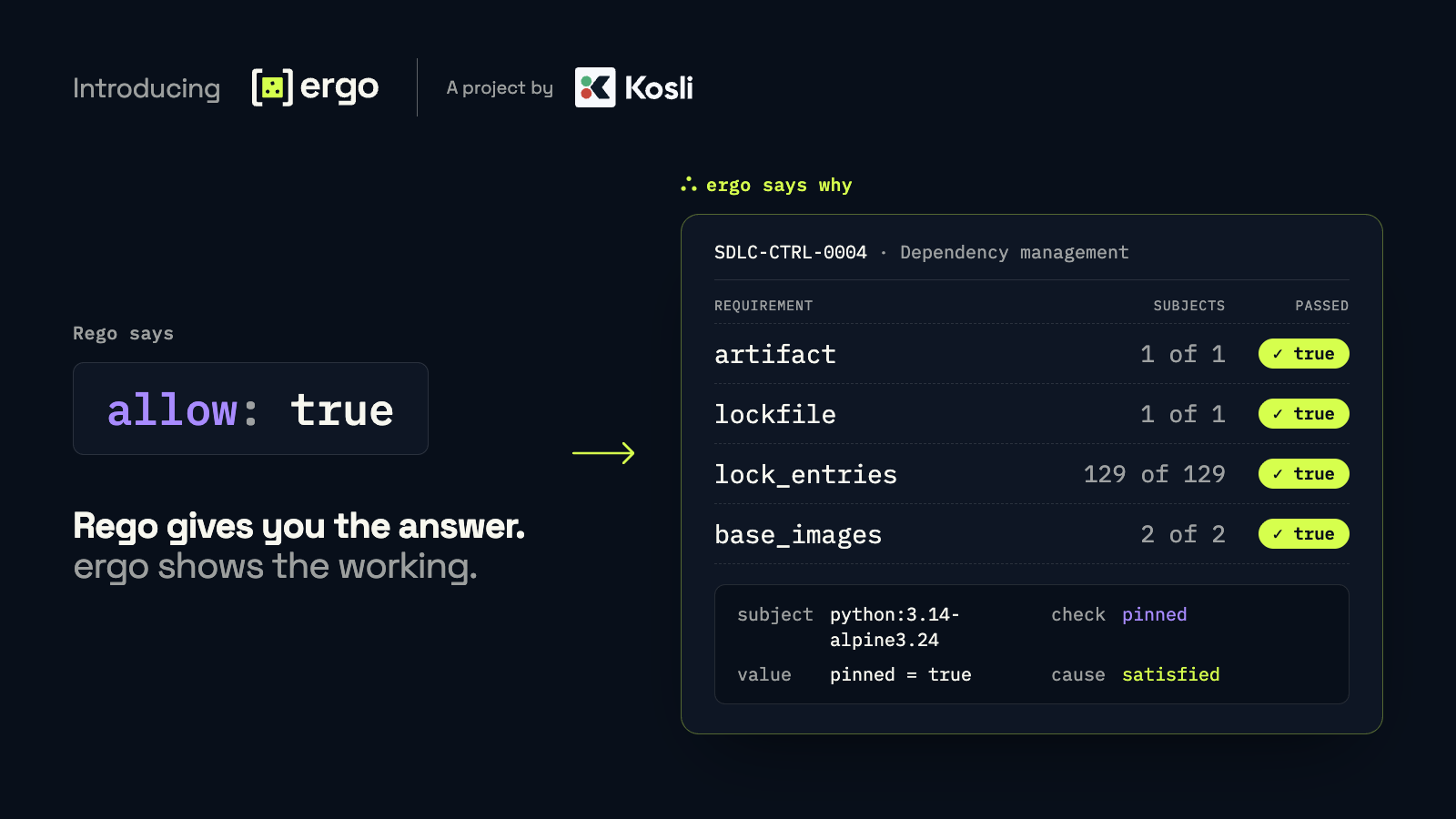
Back to the auditor and their 25 sampled changes. Here is part of the Ergo report for SDLC-CTRL-0004 on one change to our server:
| Requirement | What it checks | In scope | Status |
|---|---|---|---|
| artifact | The artifact has a digest, and its lockfile, Dockerfile and SBOM are attested to it | 1 of 1 | met |
| lockfile | The lockfile pins exact versions and carries integrity hashes | 1 of 1 | met |
| lock_entries | Every lockfile entry is pinned to a single version | 129 of 129 | met |
| base_images | Every Dockerfile base image is pinned | 2 of 2 | met |
The auditor can see that the policy checked 129 lockfile entries, one by one, for an exact version pin, and found two base images to check. Each requirement also carries checks Ergo adds itself, such as $min_subjects (the list of subjects could be read) and $unique_ids (no entry was counted twice).
Each requirement expands into one row per subject, with the value the check read. A few of the rows:
| Subject | Check | Value read | Passed | Cause |
|---|---|---|---|---|
| requests==2.34.2 | exact_pin | entry = “requests==2.34.2” | true | satisfied |
| python:3.14-alpine3.24 | pinned | pinned = true | true | satisfied |
| requirements-lock | hashes | hashed = true | true | satisfied |
Here’s the first of those rows as Ergo records it:
{
  "requirement": "lock_entries",
  "subject": { "type": "lockfile entry", "id": "requests==2.34.2" },
  "check": "exact_pin",
  "inputs": [{ "name": "entry", "value": "requests==2.34.2" }],
  "passed": true,
  "cause": "satisfied"
}
What a failure looks like
This change had no failures, so the rows below are illustrative. They show how the report records a failing check, one row per subject:
| Subject | Check | Value read | Passed | Cause |
|---|---|---|---|---|
| httpx>=0.27 | exact_pin | entry = “httpx>=0.27” | false | value |
| urllib3 | matches_lock | sbom_release (missing) | false | absent |
The cause column separates two failures that need different responses:
value: the change broke the rule. The data arrived and failed the check: the lockfile allows anyhttpxfrom 0.27 up. This is a policy violation, and the team that made the change fixes it.absent: the check had nothing to read. The SBOM arrived without a version forurllib3. This points at evidence collection, and whoever owns the SBOM step fixes it. Ifabsentrows appear across many changes, the control isn’t operating as designed, even when no change broke the rule.
A plain allow: false can’t tell these two apart. The urllib3 row is the broken check from earlier: the original policy skipped it and allowed the change, while Ergo records it as a failure.
Each decision also records the exact policy that produced it: SDLC-CTRL-0004, version 2, with the policy bundle’s SHA-256 digest. The same policy run on the same input produces a byte-identical report, so Kosli can hash it and re-check it years later.
From sampling to every change
Auditors sample because testing every change by hand costs too much. Kosli records every change as it moves from commit to production and evaluates each control on every one, so the control is tested across the whole population. That’s what we mean by continuous compliance.
Ergo makes that population testable by someone other than the engineer who wrote the policy. Every decision is stored with its report and the exact policy version that produced it.
For Kosli customers, the auditor’s request changes from “show me the evidence for these 25” to “show me any change”, and the evidence already exists. Because reports are deterministic, anyone can re-run a decision from the stored policy and input and compare the result. A loosened version range shows up as a failing row on the change that introduced it, and absent rows across the population show where evidence collection is breaking down before an auditor goes looking.
Get started
Ergo is open source and installs as a single file. It’s pre-alpha, so expect breaking changes while the language settles. Start with the getting started guide, or work through our bakery tutorial to write your first Ergo policy. The code and issues are on GitHub, and issues and pull requests are welcome.
The idea of policy decisions that show their workings comes from Toby Weston, who wrote about it in Baking in Evidence. Julien Biezemans turned it into Ergo, and his launch post tells the story of how it came together.