
 5 min read
The Kosli CLI provides several attest commands, such as kosli attest snyk, kosli attest jira, etc. These attestations are “typed” - each one knows how to interpret its own particular kind of input. For example, kosli attest snyk interprets the sarif file produced by a snyk container scan to determine the true/false value for that individual attestation.
If you’re using a tool that does not yet have a corresponding kosli attest command then, until now, you’ve had to use the “untyped” kosli attest generic command, which can attest anything, but it cannot calculate a true/false compliance value for you. Generic attestations are a useful “escape hatch”, but have their drawbacks:
- It can take some effort to calculate a
true/falsevalue in some cases. - It would be nice to split generic attestations into different types.
- Most importantly, many customers would prefer it if Kosli calculated all compliance values, as part of a zero trust model.
Based on this feedback we’ve implemented a new attest command called kosli attest custom. In a previous blog post we created a very simple custom attestation type and used it to migrate an existing generic attestation. In this blog post we’ll create a much richer custom attestation, with its own schema, and use it to check some very specific coverage metrics against thresholds.
We’ll:
- Define a custom attestation type (with schema) capturing several metrics with thresholds.
- Gather these metrics in the unit-test run.
- Add steps to our CI workflow to report the result to Kosli using the
kosli attest customCLI command. - Update the type of the attestation in the Flow’s compliance template yaml file.
Create your own rich custom attestation type
We’ll create a new custom attestation type to check some very specific coverage metrics for the cyber-dojo differ microservice’s unit-test run.
- The type is called
coverage-metrics. - An attestation against this type will be
trueonly if all its rules evaluate totrue. - It has four threshold rules, specified as jq expressions using the
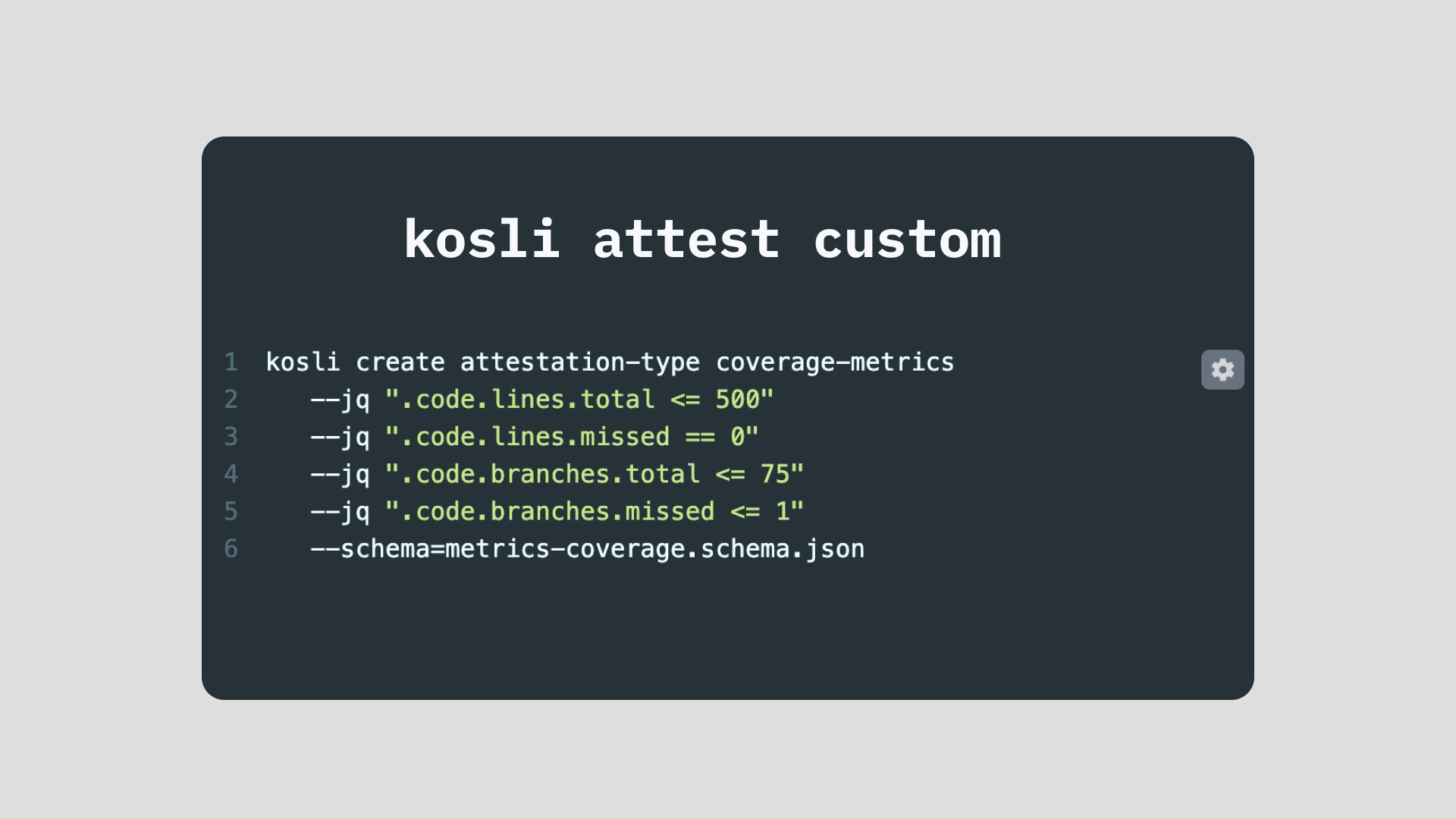
--jqflag:.code.lines.total <= 500to limit the size of our microservice.code.lines.missed == 0to enforce full statement coverage.code.branches.total <= 75to limit the complexity of our microservice.code.branches.missed <= 1to enforce (almost) full branch coverage
- It has a https://json-schema.org/draft/2020-12/schema schema defined in the file metrics-coverage.schema.json specifying the types of the names used in the
--jqexpressions, whether they are required, whether they have defaults, etc. - It lives inside a CI workflow in its own git repository
We define this new custom attestation type using the kosli create attestation-type CLI command.
 kosli create attestation-type coverage-metrics
    --jq ".code.lines.total <= 500"
    --jq ".code.lines.missed == 0"
    --jq ".code.branches.total <= 75"
    --jq ".code.branches.missed <= 1"
    --schema=metrics-coverage.schema.json
Note: the --schema and the --jq rules are both optional. If you create a type with no --schema and no --jq rules then all custom attestations made for that type will have a compliance value of true.
Gather your custom data into a json file
The gathering step is often relatively simple. You may well be doing it already. In our example we:
- added an extra reporter to the coverage library (see example)
- implemented the
JSONFormatterto save the required metrics data
(see example)
When we run our unit-tests, the reporter generates a json file called coverage_metrics.json containing the required metrics values.
{  "code": {
     "lines": {
       "total": 352,
       "missed": 0
     },
     "branches": {
       "total": 60,
       "missed": 1
     }
  },
  ...
}
Note that the json format of these values exactly matches the --jq rules in our type.
For example:
- one of the
--jqrules is.code.lines.total <= 500 - the value of
.code.lines.totalin the json file is352 352 <= 500istrue- so when Kosli processes the json file against our
coverage-metricstype it will determine this--jqrule istrue
Attest the custom result in your CI workflow
In our CI workflow we simply add a step calling the kosli attest custom command:
- The
--typeflag names the custom type (coverage-metrics) - The
--attestation-dataflag names the file containing the generated data (coverage_metrics.json) - The
--nameflag names the entry in the Flow’s template yaml file
on:
  ...

env:
  ...

jobs:
  ...
  unit-tests:
    ...
    steps:
      ...
      - name: Run unit tests
        run:
          make unit_test # Creates ./reports/server/coverage_metrics.json
      ...
      - name: Attest coverage metrics to Kosli
        if: ${{ github.ref == 'refs/heads/main' && (success() || failure()) }}
        run:
          kosli attest custom --type=coverage-metrics
            --attestation-data=./reports/server/coverage_metrics.json
            --name=differ.unit-test-coverage-metrics
The --name of our custom attestation is differ.unit-test-coverage-metrics which we add as a custom:coverage-metrics type to our Flow template yaml file.
For example:
version: 1

trail:
  ...
  artifacts:
    - name: differ
      attestations:
        ...
        - name: unit-test-coverage-metrics
          type: custom:coverage-metrics
        ...
Each kosli attest custom command adds its compliance evidence to a Kosli Trail.
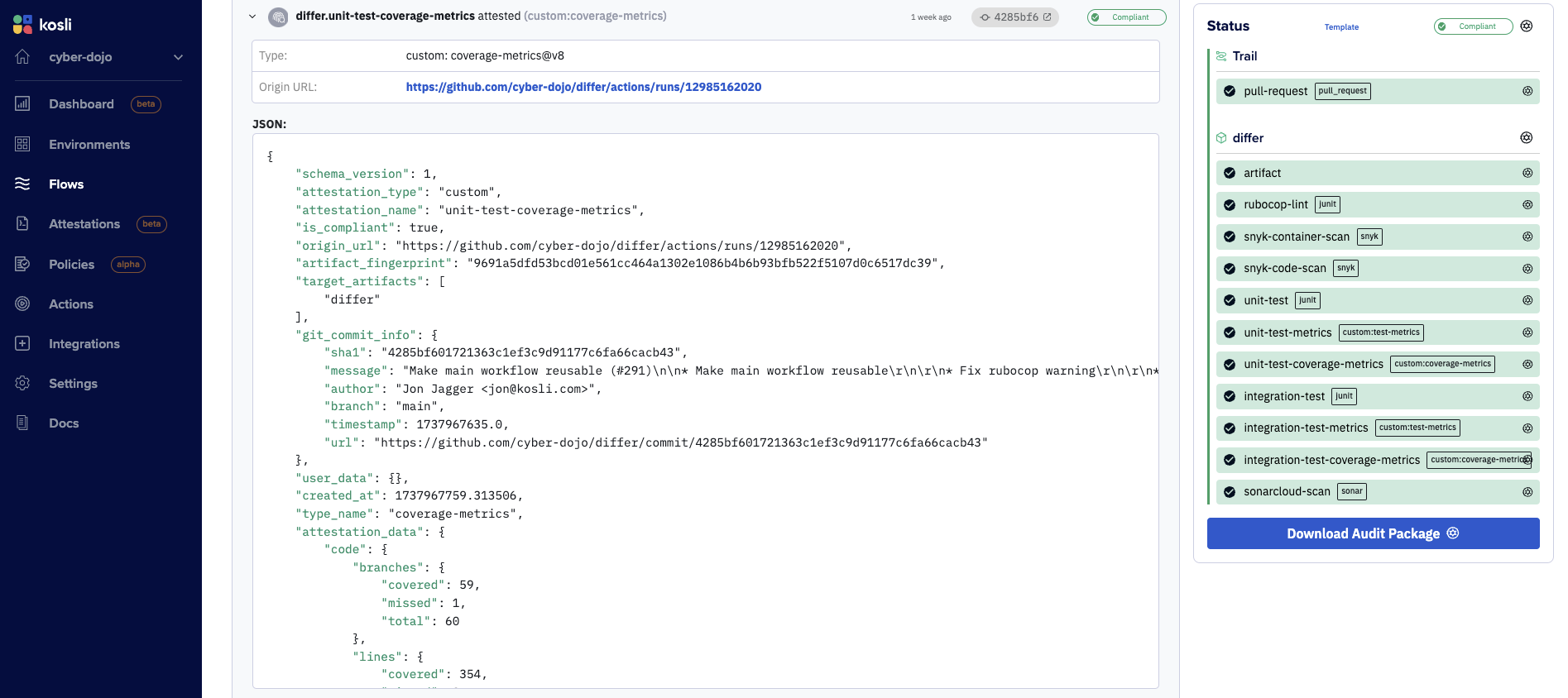
Custom attestation types are versioned
At the top of the above screenshot you can see the coverage-metrics type used for the shown attestation is v8. This is a link to the UX page listing all the versions for the type. As always, everything in Kosli is append-only. When you create a v9 (by changing the rules or schema) it can never affect any existing attestations or compliance results.
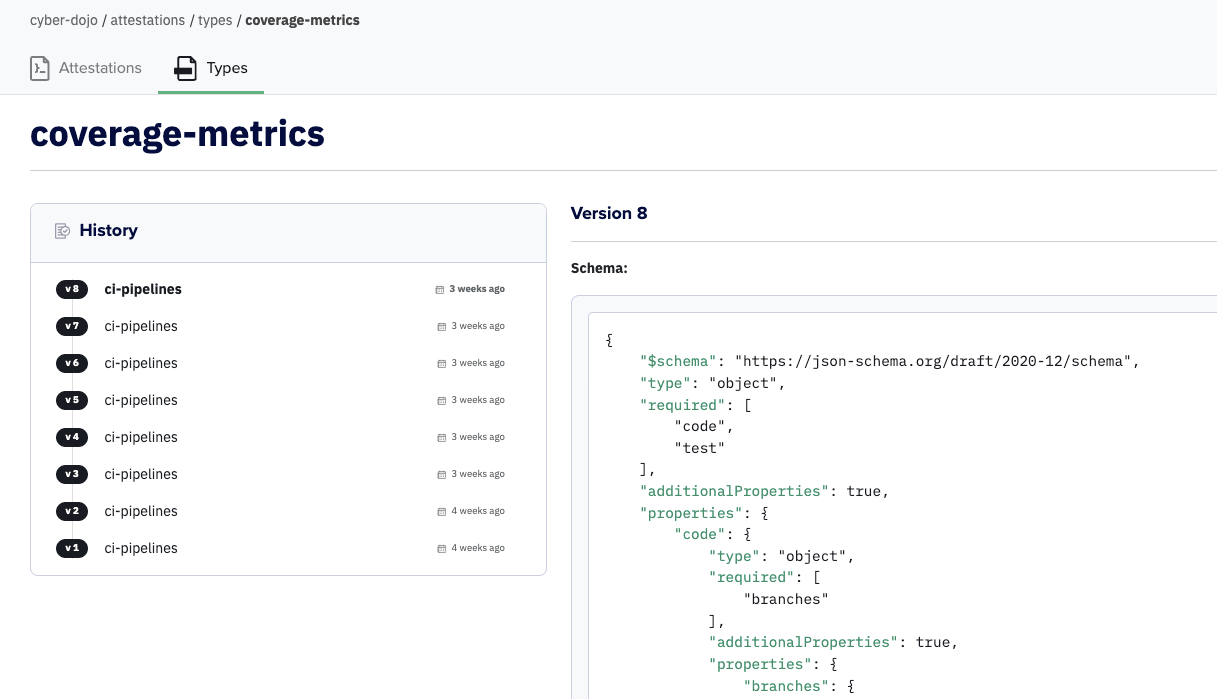
Summary
Kosli’s new custom attestations improve on generic attestations:
- You can define your own custom attestation types. These can be very simple and replace existing
genericattestations, or arbitrarily rich, expressing rules with thresholds. - These custom types can be reused across all Flows in your Kosli Org.
- Kosli can ensure each compliance calculation adheres to a provided schema.
- Most importantly, as part of a zero trust model, Kosli can now calculate the compliance values of all attestations in a Trail.